CrewNest Review (2026) — Tested for Pressure Washing Crews
CrewNest is worth a look for a solo pressure washer who wants satellite measuring and a simple quote-to-invoice flow. The Free plan covers 3 estimates and 10 measurements a month; Pro is $29.99/month. In our October 2026 test the measurements matched the map scale within 1%, but each estimate holds one service at one rate, SMS is not live yet, and card payments unlock only after setup.
TL;DR
- Verdict: a promising, honest-priced tool for solo operators who quote from satellite images, not yet a full system for a multi-service crew.
- Price: Free plan (1 user, 3 estimates and 10 satellite measurements a month); Pro $29.99/month or $290/year, 14-day trial with a card.
- Best feature: Satellite Scout measured our test surfaces within 1% of the map scale, with driveway, roof, siding and lawn zones on one property.
- Main limitation: one service type at one price per square foot per estimate, so a house wash plus driveway means two estimates.
- Not live yet: SMS (pending carrier approval) and online card payments, which need Stripe Connect and an established account.
CrewKit is reader-supported — we may earn a commission if you sign up through links on this page. It never affects our rankings or verdicts, which come from real hands-on testing.
Disclosure for this review: CrewNest’s founder gave us 30 days of Pro for testing, with no card on file. We have no affiliate deal with CrewNest, and nobody at CrewNest saw this page before it went live.
Every new piece of pressure washing software arrives with the same promise: quote from your couch, never drive to a bid again. (We have heard it so often we now quote our own skepticism by the square foot.) CrewNest makes that promise too. So we gave it our standard job and watched what happened.
CrewNest is a young field service app run from Toronto, built for three trades at once: pressure washing, lawn care and snow removal. We ran it on October 28 and 29, 2026, from first login to a sent invoice. Short version: the measuring tool is the real thing, the pricing is fair, and the paperwork side still has some growing up to do.
Bottom line upfront
CrewNest fits a solo pressure washer who quotes mostly from satellite images and wants one cheap app for measure, quote, schedule and invoice. Satellite Scout is accurate, the Free plan is genuinely usable for a few jobs a month, and Pro at $29.99/month sits at the same price as the cheapest serious alternatives.
It does not fit a crew that sells combo jobs on one document, needs to text customers today, or wants card payments from the first invoice. Each estimate carries one service type at one price per square foot. SMS is still “coming soon, pending carrier approval.” Online payments need Stripe Connect and stay locked until the account is “established.” If any of those is a dealbreaker this season, QuoteIQ does satellite quoting with more depth, and Jobber handles the full crew workflow.
Prices and features checked on crewnest.app and in CrewNest’s own documentation on October 29, 2026. Verify current terms at crewnest.app/pricing.
CrewNest pricing — verified October 2026
| Free | Pro | |
|---|---|---|
| Price | $0/month | $29.99/month, or $290/year |
| Users | 1 (just you) | Unlimited, with roles and permissions |
| Customers and jobs | Unlimited | Unlimited |
| Estimates | 3 per month | Unlimited |
| Invoices | Unlimited | Unlimited |
| Satellite Scout measurements | 10 per month | Unlimited |
| Online booking page, customer portal | Yes | Yes |
| Recurring jobs, route optimization | Yes | Yes |
| Online card payments (Stripe) | Yes, once unlocked | Yes, once unlocked |
| SMS | Coming soon (50/month) | Coming soon (unlimited US/CA, own number) |
The Free plan is permanent, not a trial. The Pro trial lasts 14 days and asks for a card up front; cancel before day 14 and you are not charged. The annual plan works out to about $24 a month.
One detail matters more than it looks: on Free, invoices are unlimited but estimates are capped at 3 a month. That is the right way round for a solo operator. You can bill every job you do. You just cannot quote a lot of new ones without paying. For a business that lives on repeat customers, Free can carry you further than the number 3 suggests.
What we tested, and how
Our standard benchmark is the same for every quoting tool: a 1,500 sq ft concrete driveway plus a soft wash on a two-story house, measured remotely, quoted, accepted, scheduled, finished and invoiced.
We measured a public building (a library parking lot and one of its round towers) rather than somebody’s home. The test customer was fictional and used our own email address, so every message CrewNest sent landed in our inbox and nowhere else. We worked in a desktop browser. CrewNest also installs on a phone as a web app (PWA); we did not test that install.
Satellite Scout: the measuring is accurate
This is the part of CrewNest that earns its keep.
You type an address, the satellite view loads (Google imagery), and you click around a surface. The docs say it plainly: “Click points around the area you want to measure. Click the first point to complete the shape.” In Multi-Zone mode you pick a zone type first (Lawn, Driveway, Roof or Siding), press “Draw Driveway” or similar, and draw. Each zone gets its own color and square footage, and the panel adds up a total.
We checked the numbers against the map itself. At the zoom CrewNest used (level 19, confirmed by its own Google Maps link), a rectangle we drew at about 130 by 90 pixels should come to roughly 7,390 sq ft. CrewNest said 7,356.87 sq ft. The round tower we boxed in as “Siding” should be about 2,667 sq ft; CrewNest said 2,656.67 sq ft. Both within 1%. That is as good as the satellite image allows.
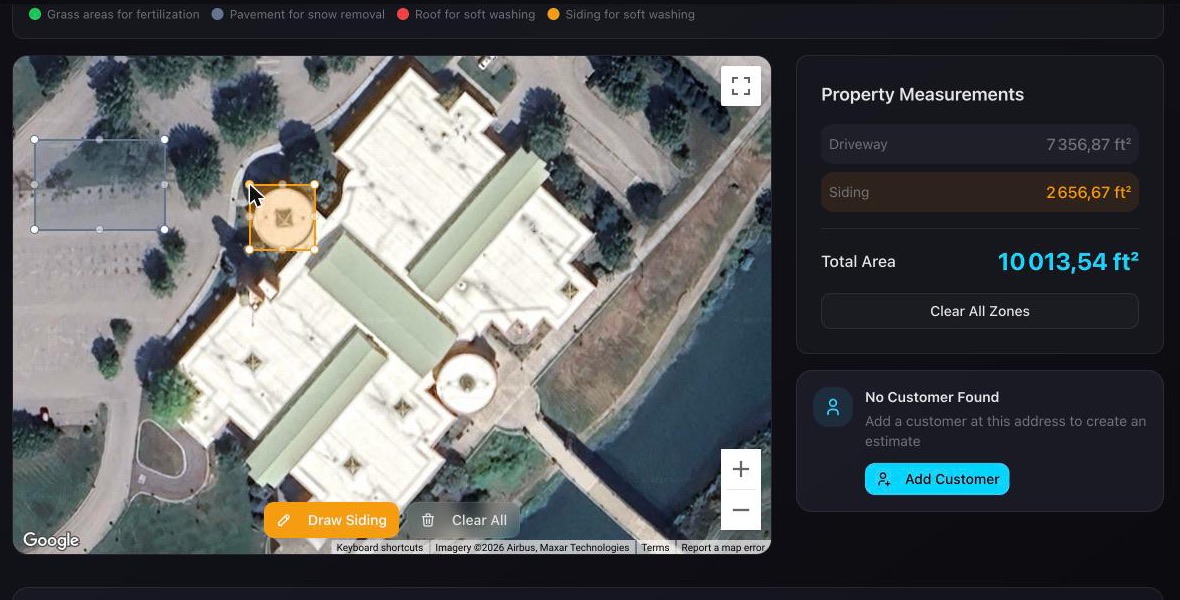
Our test screen. The comma decimals come from our browser’s language setting, not from CrewNest.
Two things to know before you trust it on a house wash:
- “Siding” measures the footprint, not the walls. The zone records the area you outline from above. There is no field for stories or wall height. For a two-story house you still convert footprint to wall area yourself, or price siding per footprint square foot and adjust your rate.
- The labels come from the other trades. The legend says “Pavement for snow removal” next to Driveway and “Grass areas for fertilization” next to Lawn. Harmless, but it reminds you this is a three-trade app.
Measurements save to the customer’s property, so the next estimate for that address starts with the square footage filled in. One small hiccup: our first try in Simple Mode did not register the clicks; Multi-Zone worked every time.
Soft Wash Chef: a mix calculator that does the math right
After you save a measurement, CrewNest offers “Soft Wash Chef,” its chemical mix calculator, with your siding square footage already filled in. Pick the surface (Roof, Siding, Concrete), the tank size and your sodium hypochlorite strength, and it tells you how many gallons of SH and water to add.
We checked the math. A 3% mix in a 50-gallon tank with 12.5% SH: CrewNest said 12.0 gallons of SH plus 38.0 of water. That is correct. It also prices the batch (SH at a default $4.00 a gallon, editable or pulled from your inventory) and suggests a job price at a 75% margin.
The catch: when we arrived from a siding zone, the mix strength sat at 3%, with a red warning that “3% exceeds the safe maximum of 1.5% for siding.” A one-click “Recommended for Siding: 1%” button fixes it. The warning is the right instinct; a default that matches the surface you came from would be better. Burned shrubs are not a fun customer conversation.
Estimates: one service, one rate
This is where CrewNest shows its age (which is to say, its youth).
An estimate is a two-step form: pick the customer, then fill in the details. The details are one service type (House Wash, Roof Wash, Driveway Cleaning, Deck/Patio, Fence, Gutter, Commercial Wash or Other), one square footage, one price per square foot, tax, validity and a description. No line items. The Edit screen offers the same fields, nothing more.
So our benchmark became two estimates: Driveway Cleaning, 1,500 sq ft at $0.15 = $225, and House Wash, 3,000 sq ft of wall area typed in by hand at $0.15 = $450. Two documents, two emails, two acceptances for one visit.
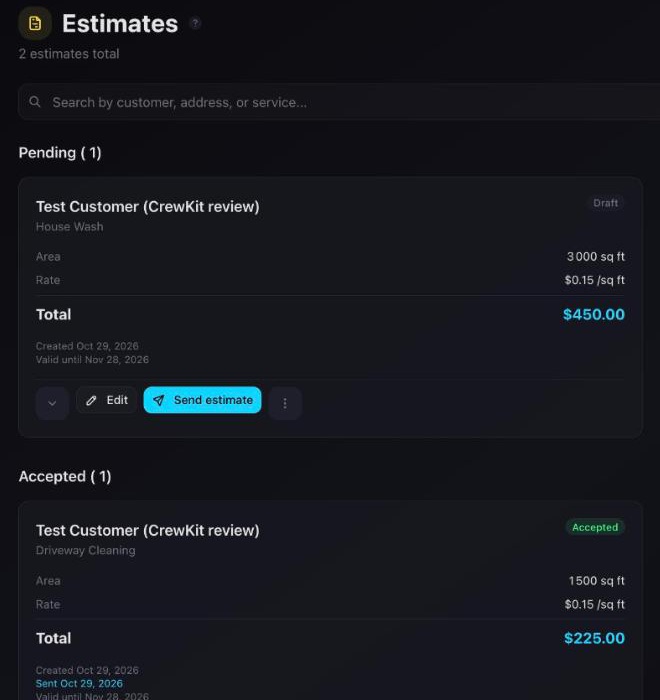
Two more things we noticed:
- The square footage pre-fills with the total of every zone. With a driveway and a siding zone saved, both the Driveway estimate and the House Wash estimate opened at 10,014 sq ft. You have to correct it each time, or you quote the whole property at one rate.
- There is one default price per square foot for the whole business (Settings › Pricing, $0.25 out of the box). Not one per service. If your driveway rate and your house wash rate differ, and they should, you type it every time.
The estimate email arrived about a minute after we pressed Send. It came from “Cole’s Business” via [email protected], with replies set to go to our own address, Accept and Decline buttons, and a two-page PDF attached. Set your business name in Settings before the first send, or your customers meet “Firstname’s Business.” The PDF showed a “DRAFT” badge although the estimate had been sent, and the price landed alone on page 2. Small things, but customers read PDFs closely.
From accepted to scheduled to invoiced
The customer side is clean. The link opens a public page, no login: service, area, total, and two big buttons. We pressed Accept. The page said the business “will be in touch to schedule your service,” and within two minutes we got an email saying the estimate was accepted, with a “Schedule the job” link.
CrewNest does not create the job on its own. The accepted estimate offers Schedule Job and Create Invoice. Schedule Job asks for a date, a time and a service type, and carries the $225 over. On the job card you get the field buttons a crew actually uses: On My Way, Finished, Take Photo, Navigate, Call Customer, Send Text.
We pressed Finished. The job moved to Completed, marked “Not billed,” and CrewNest suggested adding a Google review link in Settings to request reviews. Create Invoice produced INV-1001 for $225, due in 30 days, tagged “From Estimate” and “From Job.” Like the estimate, the invoice has one service, one description and one total.
That chain (measure, estimate, accept, job, invoice) took a few minutes, and nothing had to be typed twice except the price per square foot. That part works.
Getting paid: card payments unlock later
Here is the surprise. Online card payments are listed on both plans, but a new account cannot take them yet:
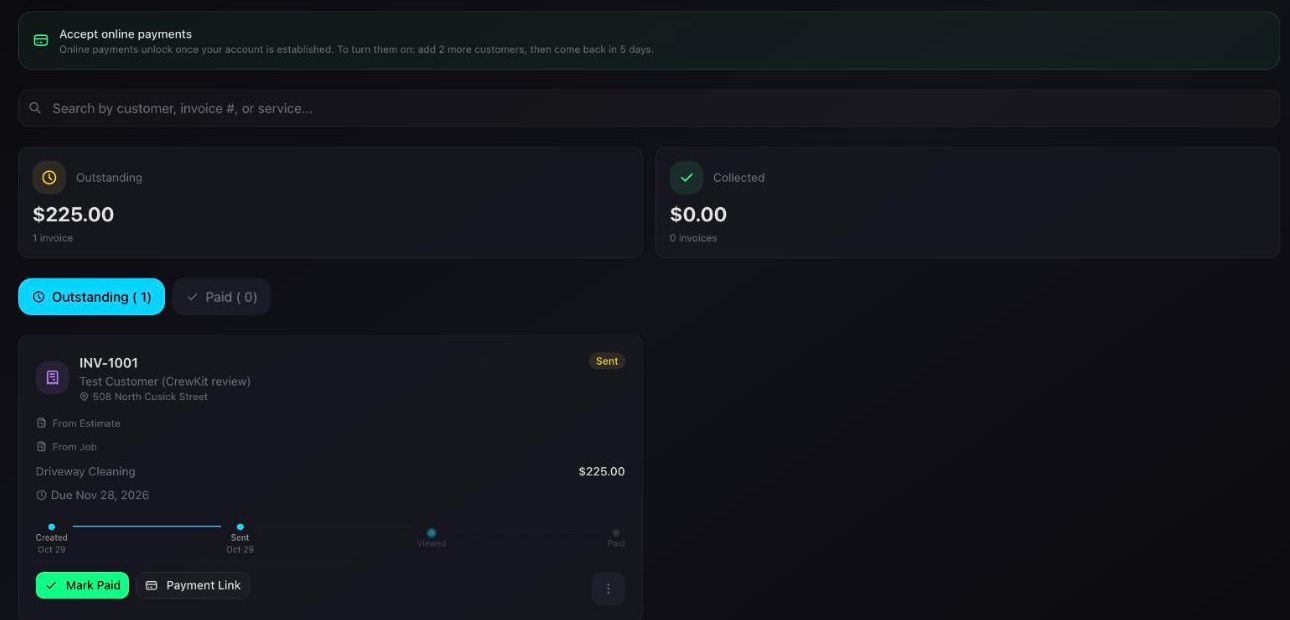
The notice reads: “Online payments unlock once your account is established. To turn them on: add 2 more customers, then come back in 5 days.” The Payment Link button, pressed anyway, answered that the business “hasn’t completed Stripe Connect setup.” So you need Stripe Connect set up, at least three customers and a few days of account age.
The invoice email we received had no PDF and no pay button, only the amount, the due date and “Please contact us if you have any questions.” Until payments unlock, you collect by check, cash or your own payment link, and press Mark Paid. We understand the anti-fraud logic. We would still rather know on day one than discover it at the first invoice, which is why it is in bold here. Getting paid on-site is worth more than most features on any list.
SMS: not live yet
CrewNest’s pricing page and docs both say SMS is “coming soon, pending carrier approval.” Until US carriers approve its registration, estimates, invoices, reminders and confirmations go out by email. We saw exactly that: every send dialog offered email only.
For a US pressure washing business that books by text, this is the biggest gap today. The Settings screen already has SMS Templates and SMS Registration sections, so the plumbing is there. Check the status before you commit a season to it.
What CrewNest gets right
- Satellite measuring you can trust. Within 1% of the map scale on both surfaces we tested, with separate zones per surface.
- A Free plan with unlimited invoices. Three estimates and ten measurements a month, no card, no expiry.
- Pro at $29.99 with unlimited users. No per-seat charge as the crew grows. Per-user pricing punishes growing crews, and CrewNest does not do it.
- A tidy measure-to-invoice chain. Each step hands its numbers to the next.
- A correct mix calculator built for soft washing, with a safety warning that fires at the right time.
- Plain cancellation. The subscription screen has a Cancel button and the line “One click. No phone call.” (We did not cancel; our access was a review account.)
What CrewNest gets wrong
- One service per estimate. No line items, so combo jobs need several documents.
- Square footage pre-fills with the total of all zones, whatever service you pick.
- One price per square foot for the whole business, not per service.
- Siding is footprint only, with no stories or wall height.
- No SMS yet, and card payments locked until Stripe Connect is set up and the account is “established.”
- Rough edges on documents: a DRAFT badge on a sent estimate’s PDF, the price alone on page 2, and a mix default that triggers its own warning.
CrewNest vs. the alternatives
| CrewNest | QuoteIQ | ServiceM8 | Jobber | |
|---|---|---|---|---|
| Entry price | Free; Pro $29.99/mo | Essentials $29.99/mo | Free; Starter $29/mo | Core $49/mo |
| Satellite measuring | Yes (10/mo free, unlimited Pro) | Yes (MapMeasure Pro) | No | No built-in calculator |
| Free plan | Yes | No | Yes (30 jobs/mo) | No |
| Best for | Solo, quotes from satellite | Solo, heavy remote quoting | Solo on iPhone | 2–5 person crews |
| Review | This page | QuoteIQ review | ServiceM8 review | Jobber review |
The closest rival is QuoteIQ: same $29.99 starting price, satellite measuring included, AI-built quotes from your own price library, but no free tier and a trial that takes a card. CrewNest wins on the free door and on unlimited users. QuoteIQ wins on quoting depth today. If you are solo and mostly need job records and on-site payment rather than remote measuring, ServiceM8 Starter at $29 is the steadier choice. For a crew that needs dispatch and multi-line quotes, Jobber is the grown-up option, at a grown-up price.
Frequently asked questions
Is CrewNest free? Yes. The Free plan costs $0, has no expiry and needs no card. It covers 1 user, unlimited customers, jobs and invoices, 3 estimates a month and 10 Satellite Scout measurements a month.
How much is CrewNest Pro? $29.99 a month, or $290 a year (about $24 a month). Pro adds unlimited estimates, unlimited measurements and unlimited team members with roles. New Pro subscriptions start with a 14-day trial that asks for a card.
Does CrewNest send text messages? Not yet. As of October 29, 2026, CrewNest lists SMS as coming soon, pending carrier approval. Estimates, invoices and reminders go out by email until then.
Can CrewNest take card payments? Through Stripe, once unlocked. A new account needs Stripe Connect set up, and CrewNest asks you to add more customers and wait a few days before online payments switch on. In our test the invoice email had no pay button yet.
How accurate is CrewNest’s satellite measurement? In our test, within 1% of the map scale on both a driveway-sized area and a building footprint. Accuracy depends on the image: trees and overhangs hide edges, and the Siding zone measures the footprint seen from above, not the wall area.
Can I put a house wash and a driveway on one CrewNest estimate? Not as separate lines. Each estimate has one service type, one square footage and one price per square foot. You can write both in the description and set a blended rate, or send two estimates, which is what we did.
Verdict
CrewNest gets the hard part right. Its satellite measuring is accurate, it is built around the surfaces pressure washers actually clean, and its pricing is honest: a real free plan, then $29.99 with no per-seat tax on a growing crew. For a solo operator who quotes mostly from a screen and runs a handful of single-service jobs a week, it is worth starting on Free today.
Where it falls short is everything after the measurement. One service per estimate, no SMS and locked card payments add up to more admin than a busy crew will accept in peak season. Those are the gaps to watch. If line items, texting and day-one payments arrive, CrewNest moves from “promising” to a strong pick in this price range. Until then, solo and patient: yes. Crew and busy: not yet.
Try CrewNest Free → https://www.crewnest.app
CrewNest reviewed hands-on with a Pro account provided by CrewNest, October 28–29, 2026. Plan limits and prices verified on crewnest.app/pricing and in CrewNest’s documentation the same day.