Best Pressure Washing Software for Solo Operators (2026) — Tested and Ranked
TL;DR
- Verdict: three picks depending on budget and platform - ServiceM8 Starter for tightest ongoing budget, QuoteIQ for AI quoting, Jobber for scaling.
- Starting price: ServiceM8 Starter is $29/month once you're actually in business (a genuine free tier — $0, 30 jobs/month, no card — lets you prove it first); QuoteIQ starts at $29.99/month; Jobber Core is $49/month.
- Best for: solo pressure washing operators running one rig and one phone, not 5+ person crews.
- Main limitation: ServiceM8 is iOS/Mac only - the Android app is reportedly weaker and not verified by CrewKit.
- Standout fact: Jobber's 14-day trial requires no credit card and auto-expires, so there's no charge risk to test it.
CrewKit is reader-supported — we may earn a commission if you sign up through links on this page. It never affects our rankings or verdicts, which come from real hands-on testing.
Nobody started a pressure washing business because they love subscription software. (If you did — good for you, genuinely, but also, please seek help.) The problem is that once you’re booking more than a handful of jobs a week, running everything on text messages and a Notes app stops being scrappy and starts costing you money in forgotten quotes, late invoices, and customers who “never got” your follow-up.
The bigger problem: most software reviews are written for operations with five-plus employees. They obsess over crew dispatch and GPS tracking — features you won’t touch for another two years. Meanwhile, the stuff that actually matters when you’re solo gets a footnote.
This guide is written for you: one rig, one operator, one phone, trying to figure out whether any of this software is actually worth the monthly fee.
Bottom line upfront: Three honest picks, each for a different situation. ServiceM8 is #1 for the tightest ongoing budget — Starter runs $29/month once you’re actually booking jobs (50 jobs/month, 100 SMS credits, unlimited users), and you can prove the whole workflow first on the genuine free tier (30 jobs/month, $0, no credit card) before paying anything. Critical caveat: iOS and Mac only; Android experience is reportedly inferior and not verified here. Not on Apple? QuoteIQ ($29.99/mo entry, Essentials plan, 500 AI credits/mo) is the AI-first quoting option for any device — estimate generation, before/after image creation, and roof/pitch measurement powered by monthly AI credits. No free tier; trial requires a credit card up front. Planning to scale? Jobber ships trade-ready (pressure washing services pre-loaded, deposit collection, contract templates) and the 14-day trial requires no card and auto-expires — zero charge risk.
The short version — who wins for what situation
If you need a decision in 30 seconds:
- #1 for tightest ongoing budget (iOS/Mac users): ServiceM8 Starter, $29/mo — prove it free first (real $0 tier, 30 jobs/month, no card). iOS/Mac required; Android caveat applies.
- #2 AI-first quoting, any device: QuoteIQ — $29.99/mo entry (Essentials, 500 AI credits/mo), scales to $699. No free tier; trial requires a credit card.
- #3 trade-ready, plan to scale: Jobber — ships with pressure washing services pre-loaded, zero-risk 14-day trial (no card, auto-expires).
- Adding a helper: FieldPulse — but read that section first. Built for 5+ technicians; not a true solo tool.
- Planning to hire soon: Housecall Pro — avoid the migration headache later.
The caveats are where the decision lives — especially the ServiceM8 one.
Now the longer version, for those of you who have been burned before (all of us, it’s fine).
5 tools compared side by side
| Software | Monthly cost | Cost at 10 jobs | Mobile | Trade-specific | Best for | Try it |
|---|---|---|---|---|---|---|
| ServiceM8 | Free–$349/mo (tiered) | $29 (free tier available under 30 jobs/mo) | ⭐⭐⭐⭐⭐ (iOS/Mac only) | ⭐⭐⭐⭐ | Tightest ongoing budget — iOS/Mac required | Try free → |
| QuoteIQ | $29.99–$699/mo (AI credit tiers) | $29.99 | ⭐⭐⭐ | ⭐⭐⭐ | AI-first quoting; any device | Try free → |
| Jobber | $49 flat | $49 | ⭐⭐⭐⭐⭐ | ⭐⭐⭐⭐⭐ | Trade-ready, plan to scale | Try free → |
| FieldPulse | Quote-only | — | ⭐⭐⭐⭐ | ⭐⭐⭐⭐ | Teams of 5+; not a solo tool | Learn more → |
| Housecall Pro | $79 flat | $79 | ⭐⭐⭐⭐ | ⭐⭐⭐⭐ | Planning to hire within 12 mo | See plans → |
Jobber — best as you scale past 15 jobs a month
Jobber is not the cheapest option on this list, and at low volume (under 10–12 jobs/month) it doesn’t need to be — because the features that make it worth $49 over $29.99 are the automation ones, and those only do real work when your quote volume is high enough that manual follow-up genuinely eats into your day.
At 15+ jobs a month, Jobber earns its spot. The automation runs in the background — quote follow-ups, review requests, payment reminders — while you’re on the rig. That’s where the $19/month premium over QuoteIQ pays. Under that volume, you can follow up on 8 quotes in 15 minutes and pocket the difference.
The plan that makes sense for solos: Core at $49/month. It covers unlimited quoting, invoicing, client management, and one-click payment collection. Don’t pay for Connect until you need route optimization or are managing a second user — and note that a second user means moving off Core (solo only) to Connect at $199/month for a team of 2–5.
What Jobber gets right for a one-person show
The mobile app is genuinely good. Not “good for a trade app” — just good. You can build a quote, attach photos, collect a deposit, and schedule the job from a parking lot in under three minutes. That matters when you’re between jobs and a lead just called.
Automated follow-ups work while you’re on the rig. When a quote goes unanswered, Jobber sends a follow-up automatically. When a job closes, it sends a review request. That’s two things most solo operators forget to do consistently — handed off to a system that doesn’t forget (which puts it one up on most of us).
Client history is searchable in seconds. When a customer calls to rebook their annual driveway clean, you can pull up exactly what you charged last year, what the surface condition was, and what chemicals you used. No digging through texts.
On-site payment collection actually works. Send a payment link from the job site, have them tap their phone, and you’re paid before the trailer’s back on the truck. The difference in cash flow is not subtle.
What Jobber gets wrong for solos
The Lite plan doesn’t include route optimization — if you’re doing eight-plus jobs in a day across a wide area, that stings. Customer support on Lite is chat and email only; no phone support until you upgrade to Core ($79/month). And the Lite plan caps you at one user, which is fine until it isn’t.
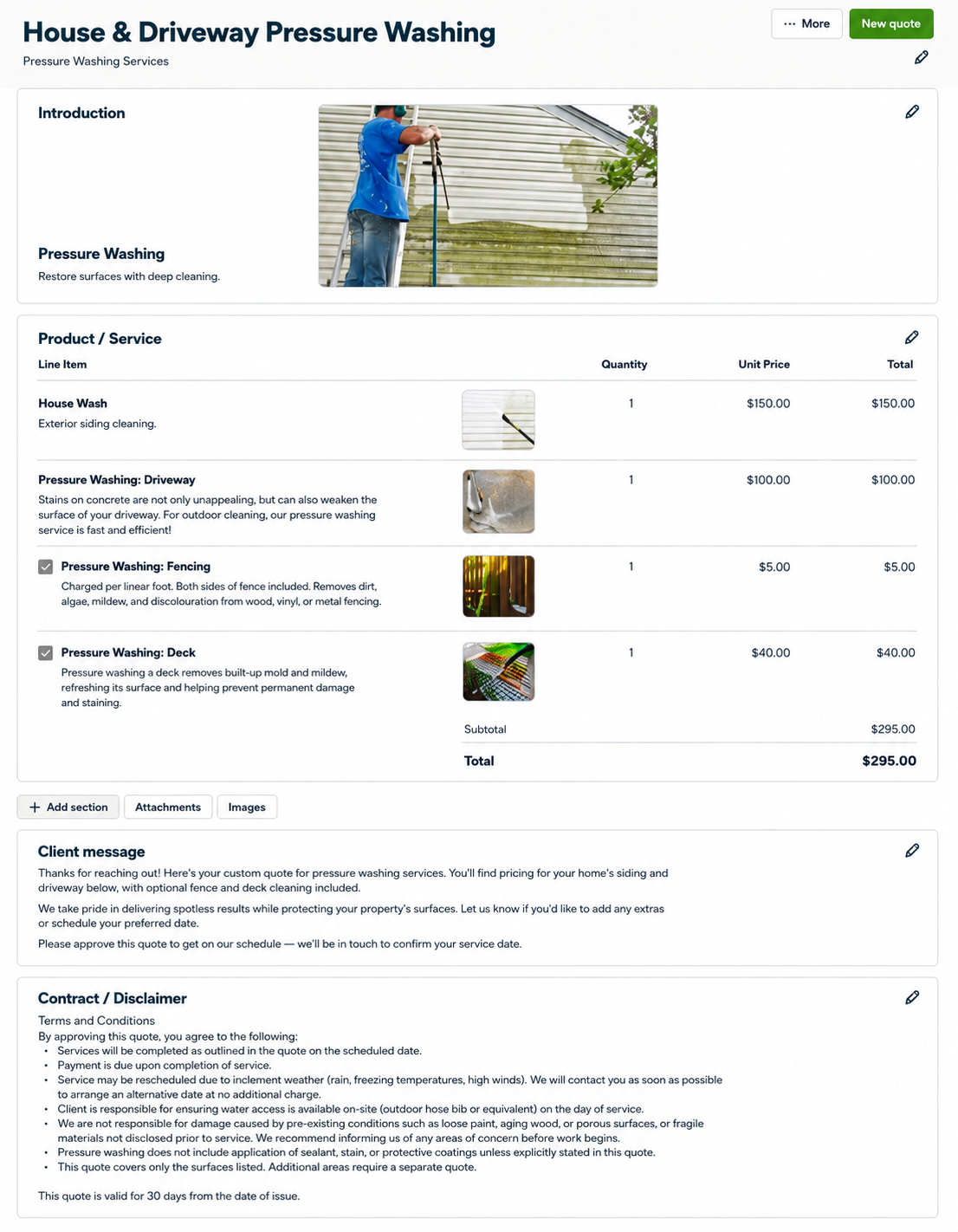
Tested June 2026 — Jobber 14-day trial (no credit card required; auto-expires). Zero-risk start: the trial ends itself, nothing to cancel. Open the quote builder and there’s already a service menu waiting — Free Assessment, Pressure Washing, Driveway Cleaning, Deck Cleaning, Sidewalk Cleaning — plus a pre-built template called “House & Driveway Pressure Washing” already in the account. Not something I configured. Just there.
The template has four pre-priced line items — these are Jobber’s editable sample values, not market rates — House Wash $150, Driveway $100, Fencing $5/linear foot (both sides included), Deck $40, example total $295. Header photo included. Pre-written client message included. Full T&C covering weather rescheduling, on-site water access requirements, exclusions for sealants and coatings, “covers only the surfaces listed,” and a 30-day validity. Change the prices to match your market, hit send. Most operators spend their first week of a new-software trial trying to build what Jobber already built for them.
Start Jobber’s free 14-day trial →
FieldPulse — not built for solo operators (read before considering)
Three things worth knowing before you go further: FieldPulse is built for teams of 5 or more technicians. Their pricing is not publicly listed — you need to contact sales to get a number. And there is no straightforward self-serve trial; expect to be pushed toward a demo call. That’s three friction points before you’ve seen the product.
If you’re strictly solo with no near-term plans to build a crew, stop here and use ServiceM8, QuoteIQ, or Jobber instead.
Where FieldPulse makes sense eventually: operations that have grown to 3–5 people in the field and need robust custom intake forms, a client portal, and unlimited-user flat pricing. That’s a legitimate use case — it’s just not a solo decision.
For a solo operator who’s not quite solo anymore — a spouse doing admin, a helper for big jobs — Jobber’s second-user path (Connect, $199/month for a team of 2–5) is usually cleaner than initiating a sales conversation to get a FieldPulse quote.
What FieldPulse gets right
Custom intake forms let you build a pressure-washing-specific workflow — surface type, square footage, access notes, existing damage — that feeds directly into estimates. This is the kind of trade-specific detail that generic CRMs make you duct-tape together. FieldPulse builds it in. (A bar that sounds obvious until you’ve spent forty minutes explaining your service types to a generic CRM.)
The customer portal means clients can view, approve, and pay quotes from a link on their phone. Fewer callbacks from people who “didn’t get the email.”
What FieldPulse gets wrong
The reporting is weak. If you want to know which service type is actually most profitable after materials and drive time, you’re doing it manually. The iOS app has had reliability reports in recent user reviews — worth verifying on current app store ratings before committing. And FieldPulse’s automation (follow-ups, review requests) isn’t as smooth as Jobber’s out of the box.
ServiceM8 — free to prove it, Starter ($29/mo) to run on it (iOS and Mac only)
The caveat comes first: ServiceM8 is iOS and Mac. If your daily driver is an Android phone, skip to QuoteIQ or Jobber. The Android experience is reportedly inferior — not hands-on verified here, but consistent enough across user reports that it’s not a footnote, it’s the first sentence.
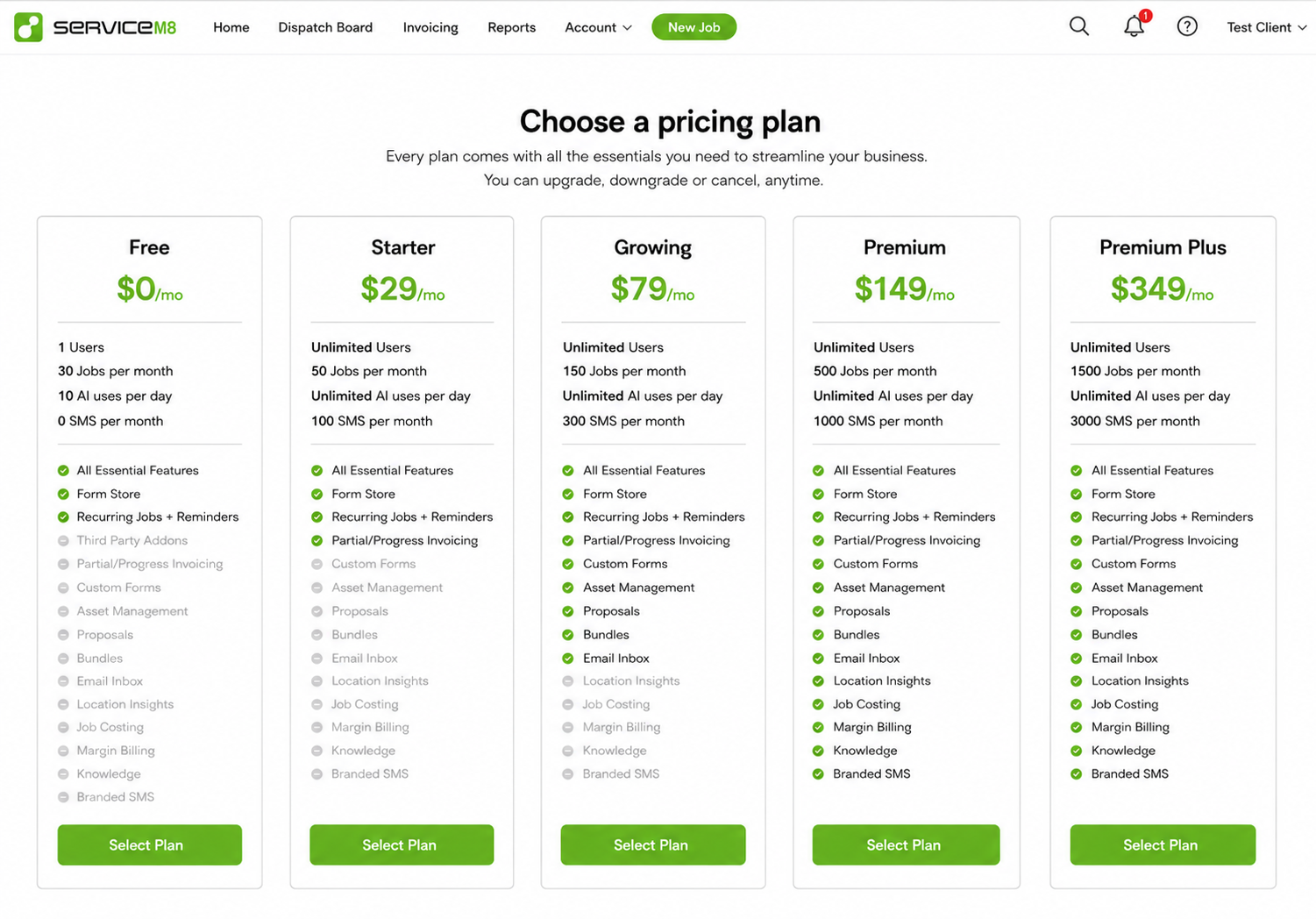
With that out of the way: ServiceM8 has a genuine, permanent free tier. Not a trial. Not “free with a credit card on file.” Free — $0/month, 30 jobs/month, 1 user, no time limit. The free plan includes email but zero SMS (texting clients starts at the $29/month Starter tier). The paid tiers stack logically: Starter at $29/month (50 jobs, 100 SMS, unlimited users), Growing at $79/month (150 jobs, 300 SMS, custom forms, proposals), Premium at $149/month (500 jobs), Premium Plus at $349/month (1,500 jobs).
That free tier is why ServiceM8 is the cheapest way to find out if this software fits your workflow — nothing to pay, nothing to cancel if it doesn’t. But it’s a proving ground, not a destination. Once you’re consistently booking work, Starter at $29/month is the honest pick: 50 jobs a month, real SMS credits, and — unlike Free — room for a helper on the account without paying extra for the seat.
What ServiceM8 gets right
The app is job-centric: every record is a Job with a status, and the dispatch board shows you where everything stands at a glance. A Google Maps view lets you see and route jobs geographically. Checklists keep you from leaving a site before the client signs off. The invoicing module connects to the job directly — no re-entry. The business reporting dashboard tracks revenue, jobs completed, average job value, quote win rate, and first-time fix rate. That’s more operational intelligence than most tools at twice the price.
What ServiceM8 gets wrong
Android support is the hard limit. iOS-first by design, and if you run Android, that matters daily. No SMS on the free plan — a real constraint if client texting is part of your workflow. No built-in recurring billing for maintenance packages.
Tested June 2026 — ServiceM8 free plan ($0/month, no time limit). The core concept clicks fast: everything is a Job. Create a job, it gets a status, it moves through a board. Built-in dispatch board, Google Maps routing view, checklist support, invoicing, reporting dashboard — all present in the free tier. Worth noting before you sign up: free plan = email, yes; SMS, no. If you were counting on texting clients from the app at $0, that’s not how it works. Paid SMS starts at $29/month. Did not test the Android version — reviews say you’d notice the difference.
Housecall Pro — best if solo is a temporary situation
At $79/month, Housecall Pro is overkill for a solo operator today. It was built for businesses with crews and dispatchers, and the pricing reflects that. So why is it on this list?
Because if you’re planning to hire your first employee in the next 6–12 months, starting on software that scales with you can save an ugly migration later. Switching CRMs mid-growth means exporting client lists, re-entering job history, and losing two weeks figuring out a new system — exactly when you can’t afford the distraction. (If you’ve ever tried to export a client list from software that doesn’t want to lose you, you know exactly how this plays out.)
Housecall Pro handles crew dispatch, GPS tracking, and multi-tech scheduling better than anything else here. If you know solo is temporary, paying $79/month now to avoid that migration is a defensible trade.
The marketing automation is also genuinely strong: automated review requests, win-back campaigns for customers who haven’t booked in 12 months, and financing options built into the quote flow — some homeowners will book a bigger job if they can pay over time.
QuoteIQ — best for AI-assisted quoting
QuoteIQ is an AI-first quoting tool built for exterior cleaning. The headline features — AutoPilot + CoPilot estimate assistance, Virtual Call Team, Before & After image generation, Estimate Generator, Auto Complete, Roof & Pitch Measurement — are included on every tier. What the tier determines is how many AI actions you get per month.
Pricing is a five-step credit ladder: Essentials $29.99/mo (500 AI credits/mo, the solo entry point), Beginner $74.99/mo (1,500 credits), Pro $149.99/mo (3,000 credits, marked “Recommended”), Elite $299/mo (5,000 credits), Max $699/mo (8,000 credits). No free tier — trial requires a credit card up front.
The estimate builder itself is generic: you create services from a blank form with your own names and pricing units (sq.ft, sq.m, per acre, linear foot — all options in the dropdown). No pre-loaded pressure-washing templates. The AI layers on top — if you want AI-generated estimate copy, before/after visuals, or satellite roof measurement, those are real tools; if you want to quote manually, the underlying builder supports that too.
At $29.99/month (Essentials), it’s $19/month less than Jobber’s entry and the cheapest AI quoting toolkit in this category. The calculus changes fast: if 500 AI credits/month isn’t enough for your volume, the next rung is $74.99/month.
The honest trade-off: QuoteIQ’s mobile app isn’t as polished as Jobber’s. Integrations are thinner. When volume and automation start to matter, you’ll probably want to move to Jobber. That’s fine — start with the AI quoting tool while the math makes sense, migrate when it doesn’t.
Tested June 2026 — Essentials trial (credit card required; $29.99/mo after 14 days, 500 AI credits/month). Before building a single quote, the onboarding served up: the Pro plan at $149.99/mo (3,000 AI credits, marked “Recommended” on the pricing page), a $299 done-for-you setup, a $199 contract template, and a website builder from $34.99/mo. Declined all four. Knowing the upsell is coming helps.
Once inside: create a customer first, then build services from a blank form. No pre-loaded pressure-washing templates — you name the service, set the price, pick a unit. Pricing-unit menu covers sq.ft, sq.m, per acre, and linear foot once you’ve configured it. The AI writing assistant for auto-generated descriptions is gated — draws down IQ credits; plain quoting doesn’t seem to touch the monthly count.
Net: a real AI quoting toolkit at $29.99/mo entry, wrapped around a generic estimate builder. The AI is the product. The builder is the frame.
The honest comparison — ServiceM8, QuoteIQ, and Jobber side by side
Three tools dominate the solo-operator decision. Here’s the clear version without the per-job spreadsheet math.
ServiceM8 (iOS/Mac only) — Starter ($29/mo) is the honest pick once you’re working: the free tier is real — $0/month, 30 jobs/month, no credit card, no time limit — and it’s the easiest way on this list to test the whole workflow before you spend anything. But if you’re already booking jobs, not just kicking the tires, Starter’s $29/month buys 50 jobs a month, real SMS credits, and unlimited users — three things the free plan doesn’t have. On Apple hardware, that’s still the cheapest paid option here.
QuoteIQ (Essentials $29.99/mo, AI-first, any device) — card required for trial: No free tier. The 14-day trial requires a credit card up front; the onboarding upsells hard before you reach the tool. The trade-off: AI-assisted estimate generation, before/after image creation, and roof/pitch measurement baked in at $29.99/month (Essentials, 500 AI credits/mo). The underlying builder is generic — you configure your own service types and pricing units — but the AI layer on top is real. Works on any device.
Jobber ($49/mo flat, any device) — zero-risk trial: The trial requires no credit card and cancels itself — there is literally nothing to forget to cancel and no charge risk. Jobber ships with pressure washing services already loaded (Pressure Washing, Driveway Cleaning, Deck Cleaning, Sidewalk Cleaning, Free Assessment) and a quote builder that includes deposits, contracts, photos, and optional line items on day one. The $19/month premium over QuoteIQ earns itself when your volume grows enough that automation (quote follow-up, review requests, route optimization) handles things you’d otherwise do manually.
What software cannot do for you at any price
No software books a job you didn’t quote. No software makes a customer call back faster. At low volume (under 8 jobs/month), honest advice is to start with ServiceM8’s free tier (iOS/Mac) or Jobber’s zero-risk trial and upgrade only when your volume proves it’s worth it. Starting free and upgrading at 10 jobs/month is not a failure — it’s how you don’t throw money at a problem that doesn’t exist yet.
The one feature that pays immediately at any volume
Online payment links. Every paid tool on this list has them; ServiceM8’s free tier does too. Getting paid on-site or same-day via a tap-to-pay link instead of waiting for a check cuts your average collection time by 7–10 days. For a solo operator billing $4,000/month, that’s real money in your account instead of floating in “the check is in the mail.”
Our verdict
On iPhone or Mac, actually working: ServiceM8 Starter is the honest pick — $29/month for 50 jobs, real SMS credits, and unlimited users (the free plan caps at one). Not sure yet? Prove the workflow first on the free tier — 30 jobs/month, $0, permanent, no credit card, email but no SMS — then upgrade the moment the free cap, the missing texts, or a second person joining you starts costing a customer. Android users: the experience is reportedly inferior — bookmark this and use Jobber’s trial instead.
Any device, want AI-assisted quoting: QuoteIQ at $29.99/month (Essentials, 500 AI credits/mo). No platform requirement. AI estimate generation, before/after image creation, and roof/pitch measurement are all included. The 14-day trial requires a credit card up front; use it during an active week with real jobs to test the AI features. The builder is generic underneath — you configure your own services — but the AI toolkit is what you’re paying for, and it’s real.
Plan to scale, want zero risk: Jobber at $49/month. The trial requires no card and cancels itself — there’s no charge risk, nothing to cancel. Jobber ships with pressure washing services already loaded and a quote builder that includes deposits, contracts, photos, and optional line items on day one. At about $19/month more than QuoteIQ, it’s the most complete entry-level tool here.
Adding a helper: Read the FieldPulse section before committing. Built for teams of 5+, requires a sales conversation to get pricing, no self-serve trial. For most solo operators adding one helper, Jobber’s second-user path is cleaner.
Planning to hire within 12 months: Start on Housecall Pro now and skip the migration headache.
What we’d do right now: if you’re on iOS, start ServiceM8’s free tier today — zero cost, real test with real jobs — and move to Starter ($29/mo) the moment you’re booking work it can’t cover. Not on Apple? Run Jobber’s 14-day trial with no card. Make the call with actual data behind it.
For the full category overview across all crew sizes and use cases: best pressure washing software →.
Frequently asked questions
Is there free pressure washing software? Yes — ServiceM8 has a genuine free plan: 30 jobs/month, 1 user, $0/month permanently, no credit card required. iOS and Mac only. QuoteIQ is not a free option: it’s a 14-day trial that requires a card upfront, then $29.99/mo. For consistent business use below 30 jobs/month on iOS or Mac, ServiceM8’s free tier is the only real answer on this list.
Can I use general invoicing software like QuickBooks or FreshBooks instead? Yes, and many solos start there. The problem is that general invoicing software doesn’t handle quoting, scheduling, or client communication in a trade workflow. You end up managing five separate apps. A field service CRM replaces all of them.
What’s the difference between pressure washing software and a general field service CRM? Mostly: terminology, templates, and trade-specific features like surface-type calculators and chemical/dilution tracking. General field service tools (Jobber, FieldPulse, ServiceM8) adapt well to pressure washing with some setup. Tools marketed for exterior cleaning (like QuoteIQ) may still require you to build your own service templates from scratch — verify the actual out-of-the-box setup before assuming less configuration.
Do I need software if I’m only doing 5–10 jobs a month? If you’re on iOS or Mac, ServiceM8’s free tier costs nothing and covers up to 30 jobs/month — test it with real jobs before committing to anything paid. Not on Apple? Jobber’s 14-day trial requires no card and auto-expires, so there’s zero risk to trying it. Paid software at $29.99–$49/month starts paying for itself around 8–10 jobs/month via online payment speed and professional quotes. Under 6 jobs/month, Wave (free) and Google Calendar are honest answers.